






Best Hair Transplant Clinic Software in the US (2026 Guide)
Compare five practice management platforms built for US hair transplant clinics ...

March 25, 2026

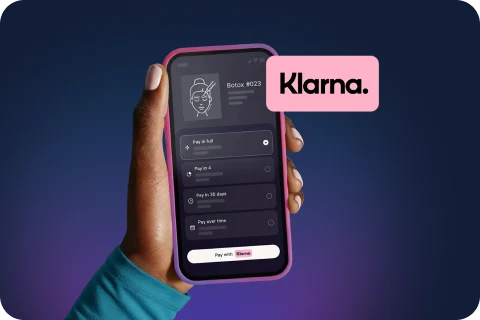
Buy now, pay later is now available in Pabau

Pabau suits multi-practitioner clinics needing advanced scheduling, clinical documentation, and automation across multiple locations.
Carepatron is designed for solo practitioners and small teams prioritising simplicity, fast setup, and an affordable entry price.
Pabau includes before/after photo management, injection plotting, and inventory tracking – features absent from Carepatron’s core offering.
Carepatron offers a free tier for solo practitioners; Pabau’s pricing is structured for clinic teams with multiple users.
For growing clinics with complex workflows, Pabau delivers more operational depth; for individual practitioners, Carepatron offers a lower barrier to entry.
Choosing between Pabau vs Carepatron comes down to one core question: what type of practice workflows and clinical requirements do you need to support? Both platforms handle scheduling, clinical notes, and invoicing – but they are built for different types of practice environments. Pabau is a clinic management platform designed for multi-practitioner settings across aesthetics, dermatology, allied health, and private GP practices. Carepatron positions itself as a comprehensive healthcare practice management and EHR platform designed to serve solo practitioners and small to mid‑sized clinical teams with an emphasis on simplicity, fast setup, and broad clinical capabilities.
This Pabau vs Carepatron comparison covers the features, pricing structure, integrations, compliance considerations, and user experience of both platforms. The goal is to give clinic owners and practice managers a clear, evidence-based view of which solution fits their operational context – not a generic feature list, but a practical evaluation of how each platform performs under real clinic conditions.
The most significant difference between Pabau vs Carepatron surfaces in clinical workflow depth. Pabau supports customizable treatment templates, before/after photo management, injection plotting, and comprehensive pre/post-care documentation – features built specifically for aesthetic, cosmetic, and dermatology-focused practices. Carepatron offers SOAP note templates and customisable clinical documentation suited to general allied health and mental health practitioners, but does not replicate the specialty-specific tools Pabau provides.
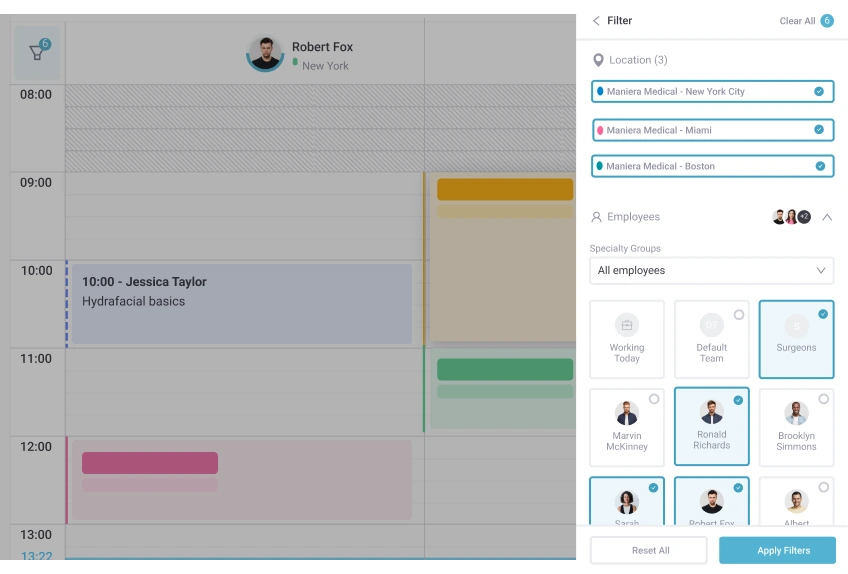
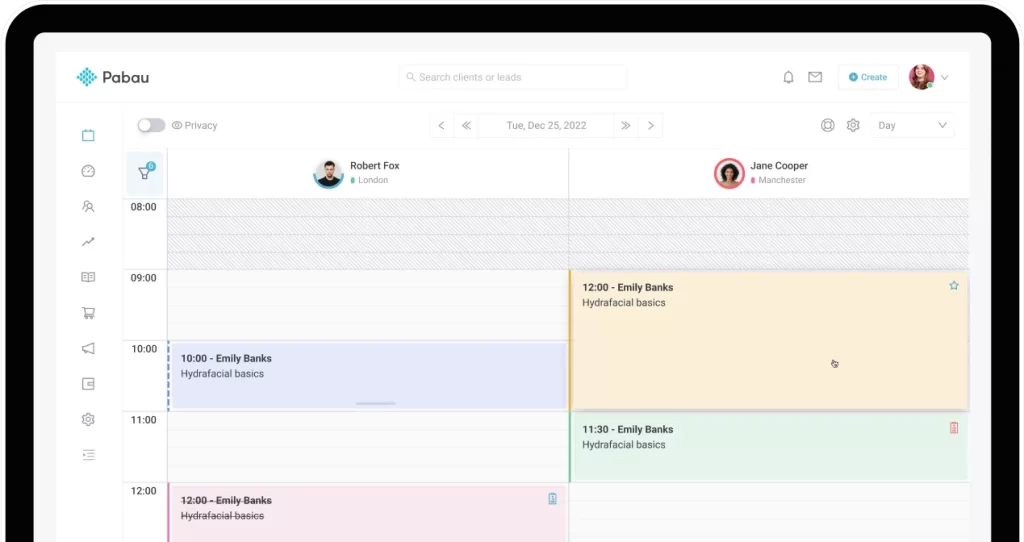
Scheduling tells a similar story. Pabau’s calendar handles multi-location environments with room and resource management, practitioner-level permissions, and automated client reminders built into the booking workflow. A clinic running three practitioners across two sites, for example, can manage availability, resource allocation, and appointment confirmations from a single interface. Carepatron’s scheduling interface is straightforward and effective for solo practitioners and small teams, but does not include the granular resource or multi-location management that larger clinics require.
On the billing side, Pabau includes integrated invoicing, payment processing, financial reporting, and stock and inventory management. Carepatron supports invoicing, payments, and some medical billing workflows, but does not include Pabau-style inventory management. For clinics that need to track product usage alongside treatment revenue, Pabau’s inventory layer adds operational value that Carepatron does not replicate.
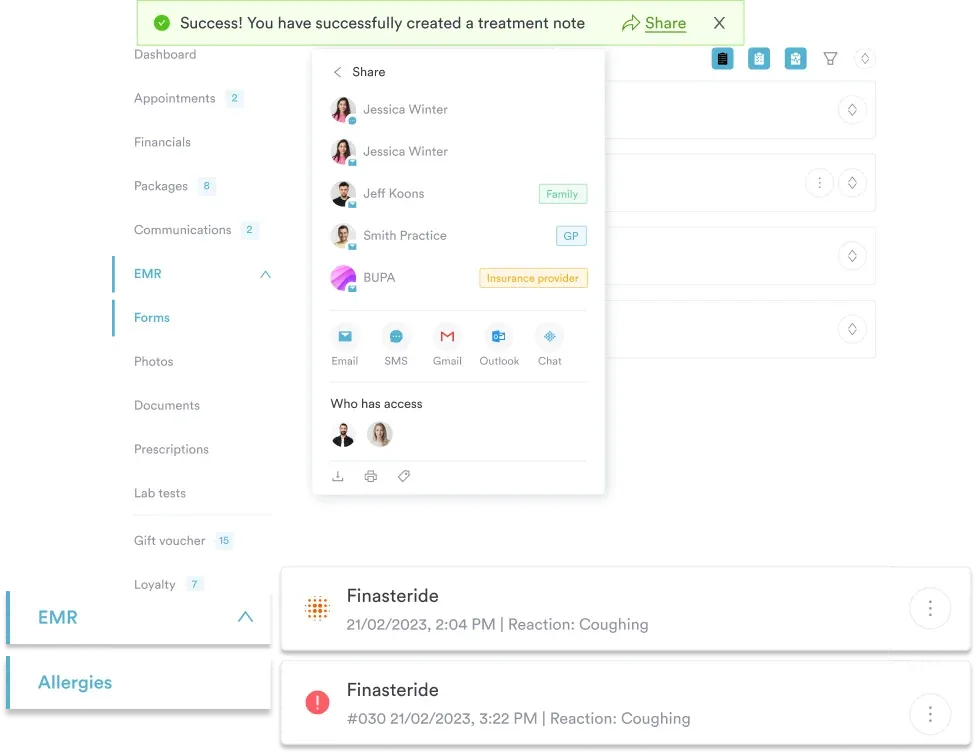
Both platforms offer a client portal and document management tools. Pabau extends this with digital consent forms, automated pre- and post-care communication, and a structured lead management workflow. These features are particularly relevant for aesthetic and cosmetic clinics where consent documentation is a compliance requirement and client journey management directly affects revenue. Carepatron supports secure forms, signatures, and messaging, but without the aesthetic-focused automation and lead workflows.
Carepatron’s primary strength is accessibility. For a solo practitioner or a small two-to-three person allied health team, the platform offers a genuinely low-friction entry point. Setup is fast, the interface is clean, and practitioners can be operational quickly without extensive onboarding or configuration. That ease of use is a real advantage for clinicians who want to focus on patient care rather than software administration.
The platform’s clinical documentation tools — including SOAP notes, customizable templates, assessments, and AI‑assisted note options — support the core record‑keeping workflows of many general allied health practices. Carepatron also offers a free plan for individual practitioners, making it one of the more accessible options for clinicians just starting out.
Integrations with tools like Stripe and Google Calendar suit individual practitioners managing their own schedules and payments. Carepatron also includes built‑in telehealth video capabilities, supporting remote consultations without separate software.
The limitations of Carepatron become apparent when clinic complexity increases. Multi-location management, room and resource scheduling, inventory tracking, and the kind of automated marketing workflows that growing clinics rely on are not part of Carepatron’s core feature set. A clinic adding a second location or a third practitioner will quickly find the platform’s scaling constraints.
Reporting and analytics are also more limited than what established clinics need for revenue management and performance tracking. Financial reporting, treatment outcome tracking, and staff performance analytics – the data layers that inform clinic growth decisions – are less comprehensive than platforms built specifically for multi-practitioner environments. For aesthetic or cosmetic clinics where before/after photo management and injection records are clinical and compliance requirements, Carepatron does not provide the specialty-specific tooling these workflows demand.
Pabau’s core advantage in the Pabau vs Carepatron comparison is operational depth across multiple clinic types. The platform supports aesthetic and cosmetic practices, dermatology clinics, private GP practices, physical therapy, mental health, and multi-specialty settings from a single unified system. Multi-location management, team permissions, automated client communications, and integrated financial workflows are all part of the standard offering – not add-ons that need to be stitched together.

Before/after photo management and injection plotting tools are notable differentiators for aesthetic and cosmetic practices. These features support both clinical record-keeping and compliance documentation in a way that general-purpose platforms cannot match. Combined with digital consent forms, automated pre/post-care messages, and a client portal, Pabau provides a complete patient journey workflow from booking through to follow-up.
According to Capterra reviewers, Pabau scores 4.6 out of 5 for overall performance, with positive themes around comprehensive clinic management features, strong automation tools, and helpful onboarding support. Trustpilot places Pabau at 4.7 out of 5, reflecting consistent satisfaction among multi-practitioner clinic teams. G2 records a 4.7 rating. Review counts were not available at the time of writing.
Pabau’s feature depth comes with a learning curve. New users – particularly those migrating from simpler tools or spreadsheet-based workflows – typically need time to configure the system and adopt its full capability. Reviewers on Capterra note this onboarding complexity as a recurring consideration, and some users report occasional software bugs during the platform’s ongoing development cycle.
Pricing is structured for clinic teams rather than individual practitioners. For a solo practitioner comparing Pabau vs Carepatron on cost alone, Carepatron’s lower entry price (or free tier) will be more attractive. Pabau delivers better value per user as team size and feature requirements grow – but the initial investment is higher for small or newly established practices.
Pricing is one of the clearest decision points in any Pabau vs Carepatron evaluation. Carepatron offers a free tier that includes core features such as clinical documentation, scheduling, telehealth, and basic billing — making it a viable starting point for solo practitioners and small teams with limited software budgets. Paid plans add features like enhanced reminders, group scheduling, and roles/permissions at accessible monthly price points (verify current plan details and feature limitations directly on the Carepatron pricing page).
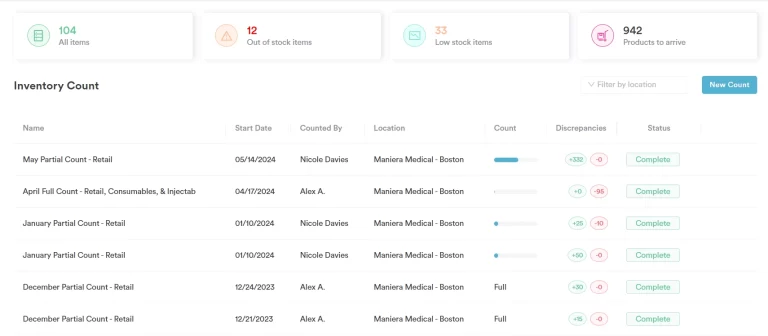
Pabau uses a subscription model priced for clinic teams, with tiered plans based on features and team size. Specific pricing is available on request at the Pabau pricing page. Rather than charging separately for individual capabilities, Pabau’s pricing bundles features such as consent forms, before/after photo workflows, automated reminders, and inventory or stock control into higher‑tier plans targeted at multi‑practitioner clinics. As team size increases, Pabau’s feature depth relative to per‑user cost often becomes more competitive for clinics with multiple practitioners.
Solo practitioners and small practices may find Carepatron’s lower entry price and free tier attractive, while established multi‑practitioner teams will often appreciate the broader clinical and operational depth that Pabau delivers for a total cost that may be lower than assembling equivalent functionality with separate tools.
Both platforms’ pricing should be evaluated against total operational cost, not just the subscription fee alone. A clinic using separate tools for consent forms, before/after photos, automated reminders, and inventory management will often find that a unified platform like Pabau reduces total software spend despite a higher headline price.
Before finalising your platform decision, map every software tool your clinic currently uses – scheduling, consent forms, billing, reminders, photography, and inventory. Calculate the combined monthly cost. Platforms like Pabau consolidate these into one subscription, which frequently undercuts the total cost of running five separate tools. Run the numbers before defaulting to the lowest individual subscription price.

From multi-location scheduling and clinical notes to automated consent forms and financial reporting – Pabau brings your whole operation into one connected platform. Book a personalised demo and see how it fits your clinic.

Integration ecosystems reflect the intended user base of each platform. Carepatron supports payment processing (including Stripe), calendar syncing for scheduling workflows, and built‑in telehealth video consultations, which together cover the core operational needs of solo practitioners and small teams. The integration scope is deliberately limited to what solo and small-team users need most, which keeps setup simple but constrains more complex clinic technology stacks.
Pabau’s integrations target clinic-scale operational needs, connecting with payment processors, marketing tools, and healthcare-specific systems. For a clinic running email marketing alongside patient management, or integrating payment processing directly into the booking workflow, Pabau’s connected architecture reduces the manual reconciliation that separate tools require. Clinics operating in regulated markets also benefit from compliance management features built into the platform rather than bolted on through third-party integrations.
Support model differences are equally significant. Pabau offers dedicated onboarding support, live chat, and a knowledge base – with implementation support designed specifically for clinics migrating from existing systems. This matters for practices with complex data migration requirements or multiple practitioners who need guided setup. Carepatron’s support emphasizes self‑service documentation, email and in‑app support channels, and knowledge base content, with options for live help depending on plan level. Neither model is objectively superior – it depends entirely on how much hands-on support your team needs during setup and beyond.
User review data for this Pabau vs Carepatron comparison reflects a clear pattern. Pabau holds a strong set of verified ratings across major review platforms: it has a 4.7‑star rating on Capterra with over 600 reviews, a 4.7‑star rating on G2 based on hundreds of user reviews, and a 4.7‑star Trustpilot TrustScore from around 280+ reviews. Positive themes from Pabau reviewers consistently reference comprehensive clinic management features, strong automation capabilities, and helpful onboarding support. The recurring areas for improvement centre on the initial learning curve and occasional software issues during updates.
Carepatron holds a 4.5‑star rating on Capterra (500+ reviews) and on G2 (500+ reviews), with a Trustpilot profile showing additional user feedback. Pabau has a 4.7‑star rating on Capterra with over 600 reviews and a strong presence on Trustpilot as well, reflecting broad user sentiment across multiple review sites. Based on product positioning and user community feedback, the consistent themes are ease of setup, an accessible entry price, and a clean interface well-suited to solo practitioners. Clinicians who have outgrown Carepatron frequently cite the need for more advanced reporting, better multi-practitioner coordination tools, and specialty-specific clinical documentation as reasons for migrating to platforms with greater depth.
The available review data offers insight into user experience rather than sheer volume. Pabau reviews often highlight features geared toward multi-practitioner clinics, such as inventory management, treatment workflows, and multi-location scheduling. Carepatron reviews tend to emphasize ease of setup, simplicity, and suitability for solo practitioners or small teams. When evaluating practice management software for a growing clinic, examining the themes and context of verified user feedback can be more informative than comparing review counts alone.
The decision in any Pabau vs Carepatron evaluation depends on where your practice is today and where it is heading. Three questions clarify the choice quickly: How many practitioners work at your clinic? Do you operate across more than one location? Does your clinical workflow require specialty-specific documentation – consent forms, before/after photography, injection records?
Choose Carepatron if you are a solo practitioner or a small allied health team (two to three practitioners), you prioritise ease of setup over feature depth, and your practice operates from a single location with straightforward scheduling and billing needs. Carepatron offers a free tier, making it a low-risk starting point for practitioners who are new to digital practice management.
Choose Pabau if you run a multi-practitioner clinic – whether in aesthetics, dermatology, private GP, physical therapy, mental health, or a multi-specialty setting – and you need a platform that handles scheduling, clinical documentation, consent management, financial reporting, and automated client communications in one connected system. Pabau is also the stronger choice for any clinic planning to scale, add locations, or increase team size over the next 12-24 months.
Practical use cases sharpen this Pabau vs Carepatron comparison beyond feature lists. Consider a dermatology clinic with five practitioners across two sites: they need multi-location calendar management, before/after photo records for each treatment, digital consent documentation for regulated procedures, and financial reporting that consolidates revenue across both sites. Pabau handles all of these within a single platform. Carepatron could support some basic functions for small teams, but does not provide the advanced multi-location scheduling, resource management, or reporting capabilities required for this workflow.
Contrast that with an independent occupational therapist running a private practice from a single consulting room, seeing 18 clients per week. They need scheduling, SOAP notes, invoicing, and a basic client portal. Carepatron’s interface is well-matched to that workflow, and the lower subscription cost (or free tier) makes financial sense for a solo operation at that scale.
For medical spa practices, skin clinics, and mental health practices that are growing – adding practitioners, expanding services, or considering a second location – the platform decision made today has a compounding effect on operational efficiency over the following years. Migrating between platforms mid-growth is costly and disruptive, so choosing a platform with the capacity to scale from the outset can reduce future transition overhead.

Need a detailed Carepatron alternative overview? Carepatron Alternatives covers the leading practice management platforms across different clinic types and sizes.
Evaluating Pabau against the broader market? Pabau Competitors and Alternatives provides a structured breakdown of how Pabau positions against other clinic management solutions.
Want to understand what clinic software should include? Clinic Management Software Buyer’s Guide outlines the key features and questions every clinic owner should evaluate before committing.
Looking at practice management features in depth? Practice Management Software Features explains the core capabilities that separate basic scheduling tools from full clinic operating systems.
The Pabau vs Carepatron comparison resolves differently depending on practice scale and complexity. Carepatron offers a clean, accessible entry point for solo practitioners and small allied health teams who need core scheduling, clinical notes, and invoicing without a steep learning curve or high initial cost. That is a genuine strength for the audience it is designed to serve.
Pabau operates at a different level of clinical and operational depth. For multi-practitioner clinics across aesthetics, dermatology, private medicine, physical therapy, and multi-specialty environments, Pabau provides the scheduling infrastructure, clinical documentation tools, compliance features, automation workflows, and financial reporting that complex practice management requires. The automated workflows, team management, and multi-location capabilities are built for clinics that have moved beyond the solo practitioner model.
If your clinic is growing – or you anticipate growth – choosing a platform with the operational depth to support that trajectory is a decision worth making early. Pabau is built for that journey.
It depends on team size and workflow complexity. Carepatron is better suited to solo practitioners and very small teams (two to three people) who need a simple, low-cost solution. Pabau is the stronger choice for small clinics with multiple practitioners, specialty-specific documentation needs, or plans to grow – it scales in ways Carepatron does not.
Pabau’s scheduling supports multi-location environments, room and resource management, and advanced automated reminders integrated into the booking workflow. Carepatron offers straightforward calendar scheduling suitable for solo practitioners or small teams. For clinics with multiple practitioners or sites, Pabau provides more advanced scheduling controls.
Carepatron offers a free tier for solo practitioners and paid plans at accessible monthly rates. Pabau is priced for clinic teams and delivers greater per-user value as team size and feature requirements grow. Total operational cost — including any separate tools currently used — should factor into the comparison.
Carepatron provides invoicing, billing codes, and basic medical billing workflows for general practice and allied health practitioners. For clinics needing comprehensive financial reporting, inventory management integrated with billing, or multi-location revenue consolidation, Pabau’s billing capabilities are more extensive. Verify current Carepatron billing features directly with the vendor.
Carepatron is used primarily by solo practitioners and small allied health teams – psychologists, occupational therapists, speech therapists, and general practitioners in small private practices. Pabau serves a broader range of clinic types including aesthetic and cosmetic clinics, dermatology practices, medical spas, private GP and wellness clinics, physical therapy, mental health practices, and multi-specialty or multi-location healthcare operations.