Coolsculpting Diagram
 By Ivana Karafiloska on January 8, 2026
 Fact checked by: Teodor Jurukovski

Discover free eBooks, guides and med spa templates on our new resources page


Read case studies from our satisfied clients

Compare Pabau with alternative systems
 Integrations

 Measure Pabau savings
 Our security commitment
 About us
Learn why this holistic care and aesthetic medicine clinic chose Pabau to power patient care and performance.
Read more By Ivana Karafiloska on January 8, 2026
Fact checked by: Teodor Jurukovski
By Ivana Karafiloska on January 8, 2026
Fact checked by: Teodor Jurukovski
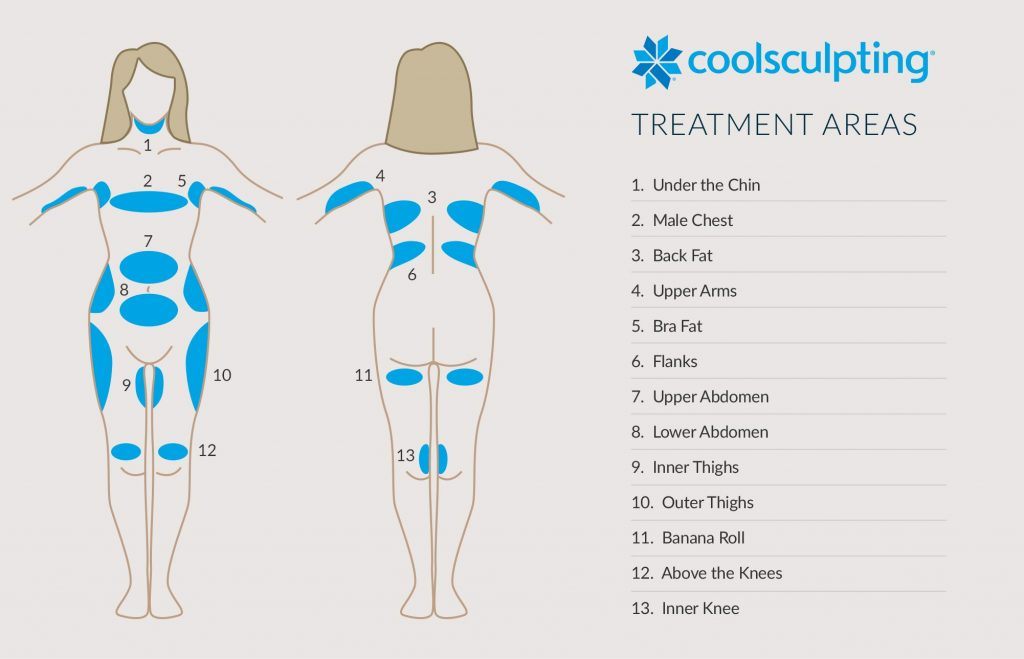
Cryolipolysis Technology The diagram illustrates how controlled cooling targets fat cells whilst preserving surrounding tissue integrity.
Visual Patient Education Clear anatomical illustrations enhance patient understanding and support informed consent discussions.
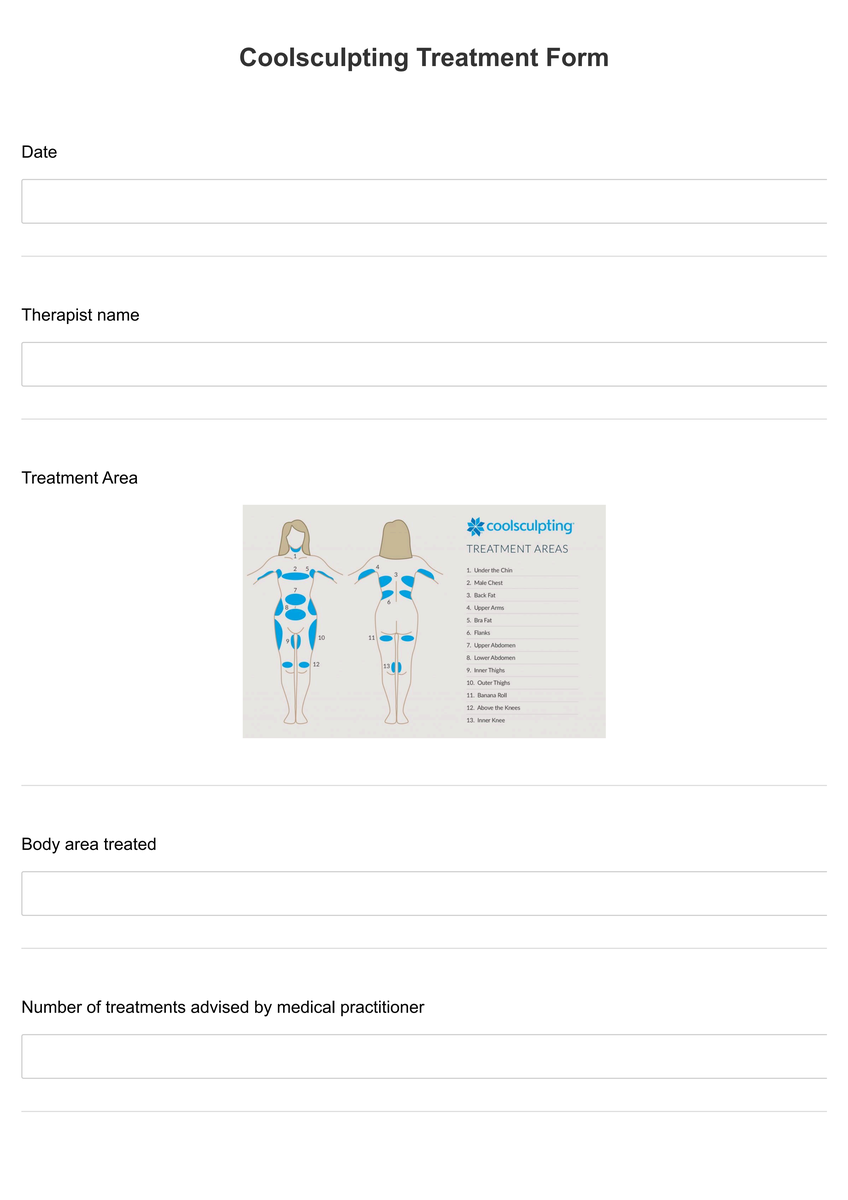
Treatment Areas The diagram identifies suitable body regions and explains anatomical considerations for optimal results.
Professional Documentation Serves as standardised reference material for consistent patient education across clinic consultations.
A CoolSculpting diagram is a comprehensive visual educational resource designed to illustrate the cryolipolysis fat reduction process. This professional diagram provides detailed anatomical representations showing how controlled cooling technology selectively targets subcutaneous fat cells whilst preserving surrounding skin, muscle, and nerve tissue. The diagram serves as an essential communication tool during patient consultations, helping practitioners explain the scientific principles behind non-invasive body contouring.
The diagram demonstrates the precise mechanism by which fat cells undergo apoptosis when exposed to controlled cooling temperatures. Furthermore, it illustrates the natural elimination process through which the body metabolises damaged fat cells over the following weeks and months. This visual representation enables patients to understand the gradual nature of results and sets appropriate expectations for their treatment journey.
First access the CoolSculpting diagram PDF document by downloading it from Pabau below. The high-resolution diagram can be printed for consultation rooms or displayed digitally on tablets or consultation screens. Ensure the diagram is readily available during initial consultations and pre-treatment discussions to maximise its educational value.
Present the diagram during the initial consultation phase to explain the cryolipolysis process. Use the anatomical illustrations to demonstrate how the cooling applicator positions over treatment areas and how fat cells respond to controlled temperature exposure.
Utilise the diagram to identify suitable treatment zones on the patient's body. Point out areas where CoolSculpting achieves optimal results, such as the abdomen, flanks, thighs, and submental region, whilst discussing individual anatomical considerations.
Reference the timeline illustrations within the diagram to explain the gradual fat reduction process. Demonstrate how results develop over 8-12 weeks as the body naturally eliminates damaged fat cells through the lymphatic system.
Incorporate the diagram into your informed consent process, ensuring patients understand the procedure's mechanism, expected outcomes, and potential variations in individual results.
The CoolSculpting diagram proves invaluable for aesthetic practitioners, cosmetic surgeons, and medical professionals offering non-invasive body contouring services. Clinic staff members, including nurses and patient coordinators, benefit from having standardised visual materials to support consistent patient education across all consultations.
Patients considering CoolSculpting treatment gain significant value from visual learning aids that clarify complex biological processes. The diagram particularly assists patients who prefer visual explanations over verbal descriptions, enhancing their comfort level and confidence in their treatment decision. Additionally, it serves as a reference tool that patients can review during their consideration period.
The CoolSculpting diagram transforms complex medical concepts into accessible visual information, bridging the communication gap between practitioners and patients. This professional resource elevates the consultation experience whilst ensuring patients make well-informed treatment decisions based on clear scientific understanding.
The diagram incorporates essential safety information highlighting contraindications and precautions associated with cryolipolysis treatment. It illustrates proper applicator positioning to avoid sensitive areas and demonstrates the importance of skin assessment prior to treatment. This visual reference helps practitioners identify suitable candidates whilst recognising when alternative treatments might be more appropriate.
Additionally, the diagram outlines expected sensations during treatment, from initial cooling through the numbness phase, helping patients understand normal treatment responses versus concerning symptoms that require immediate attention.
The comprehensive diagram includes post-treatment care instructions illustrated through clear visual guidelines. It demonstrates proper massage techniques to enhance lymphatic drainage and shows the gradual fat reduction timeline patients can expect. This section helps patients understand the importance of following post-care instructions to optimise their results.
The timeline component of the diagram proves particularly valuable in managing patient expectations, showing realistic progression from treatment day through final results at 12 weeks. This visual timeline reduces patient anxiety about the gradual nature of cryolipolysis outcomes.